Create a Qualifications Framework
Overview
Use this page to create a new qualifications framework. This is helpful when you need a structure for grouping qualifications before adding them to plans.
Permissions / Access
Who can perform this action?
- Company Manager
Navigation Path
Admin Dashboard -> Qualifications Tab-> Manage Qualification Frameworks
Steps
- Click on Admin Dashboard in left navigation menu.
- Select the Qualifications tab.
- Select Manage Qualification Frameworks.
- Select Add new qualifications framework.
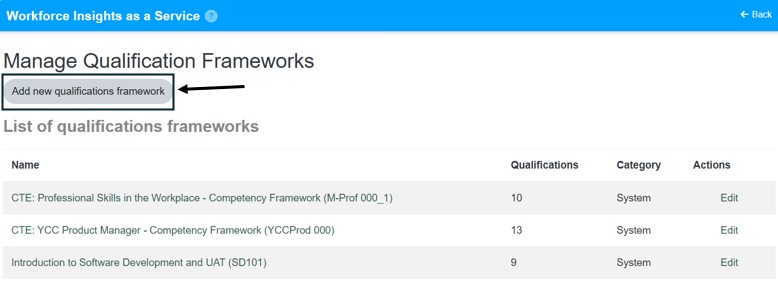
- Enter the required framework details.
- Select Save Changes.
Result
- A new qualifications framework is created.
- The framework is available for adding qualifications.
Notes / Tips
- Use a framework name that clearly identifies the qualification group it contains.
- Create the framework before attempting to add qualifications or build plans from it.
Troubleshooting
Common issue: The new framework does not appear after saving.
Solution: Refresh the page and confirm the framework name was saved successfully.
Common issue: You cannot create a framework.
Solution: Confirm your role has company-level qualifications management access.