Delete Qualification in a Framework
Overview
Use this page to remove a qualification from a framework. This is helpful when a qualification is no longer needed or was added in error.
Permissions / Access
Who can perform this action?
- Company Manager
Navigation Path
Admin Dashboard -> Qualifications Tab -> Manage Qualification Frameworks
Steps
- Click on Admin Dashboard in left navigation menu.
- Select the Qualifications tab.
- Select Manage Qualification Frameworks.
- Select the framework that contains the qualification.
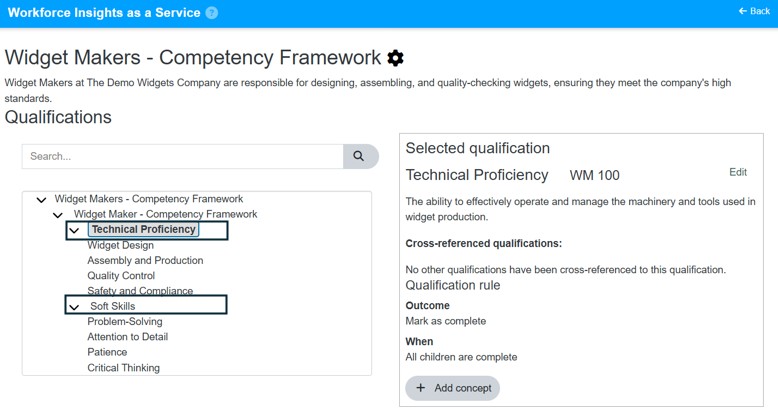
- Select the qualification you want to remove.
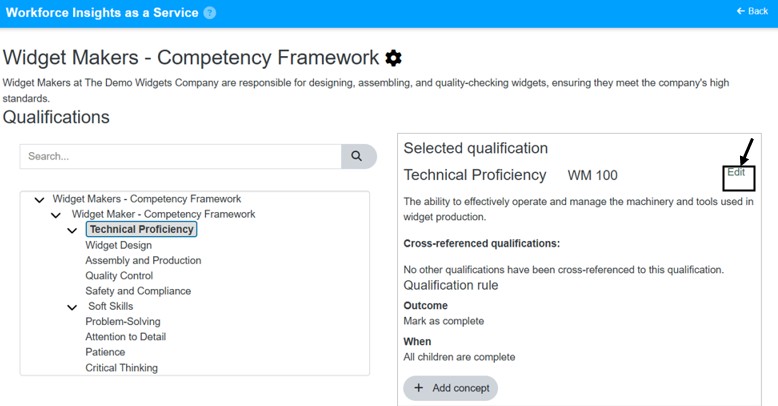
- Select Edit.
- Select Delete.
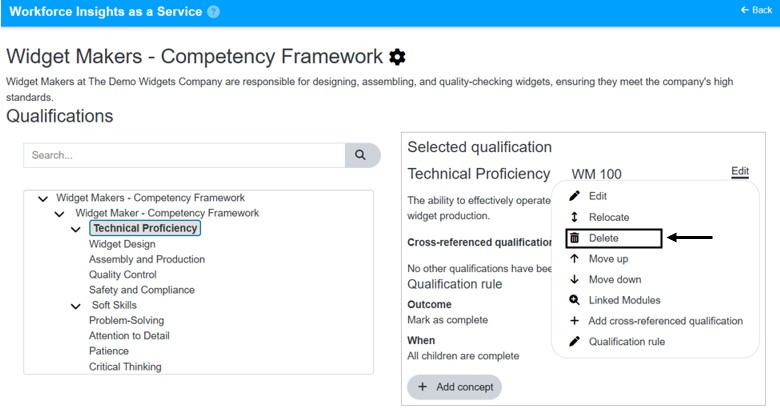
- Confirm the deletion if prompted.
Video
*Note: This video reflects a previous version of the platform. Access Admin Dashboard from the left navigation menu. The remaining steps are unchanged.
Result
- The qualification is removed from the framework.
- The qualification is no longer available for future plan setup in that framework.
Notes / Tips
- Review dependent plans before deleting a qualification.
- Delete only after confirming the qualification is no longer needed.
Troubleshooting
Common issue: The qualification cannot be deleted.
Solution: Check whether the qualification is still referenced by related setup that must be updated first.
Common issue: The wrong qualification was selected.
Solution: Cancel the action and verify the qualification name before deleting.