Edit a Qualification in a Framework
Overview
Use this page to update the details of an existing qualification in a framework. This is helpful when qualification names, requirements, or settings need to be corrected or revised.
Permissions / Access
Who can perform this action?
- Company Manager
Navigation Path
Admin Dashboard -> Qualifications Tab -> Manage Qualification Frameworks
Steps
- Click on Admin Dashboard in left navigation menu.
- Select the Qualifications tab.
- Select Manage Qualification Frameworks.
- Select the framework that contains the qualification.
- Select the qualification you want to update.
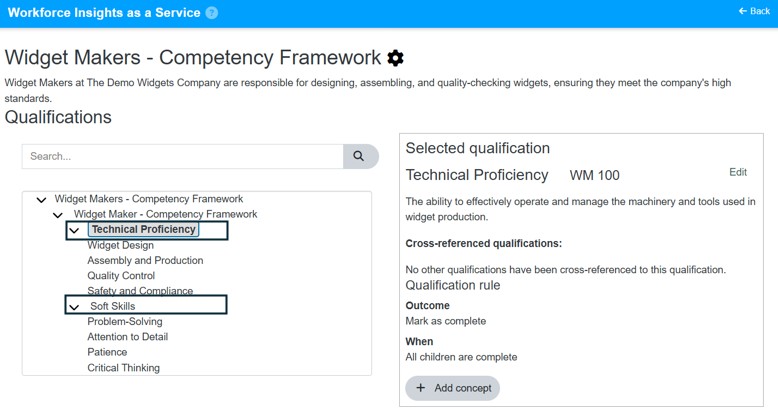
- Select Edit.
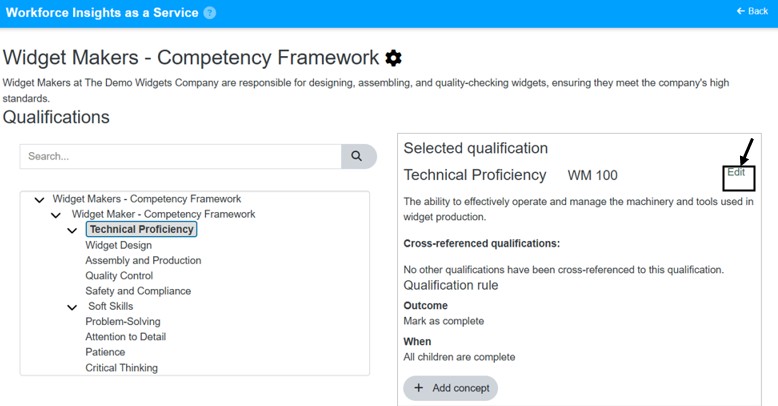
- Select Edit
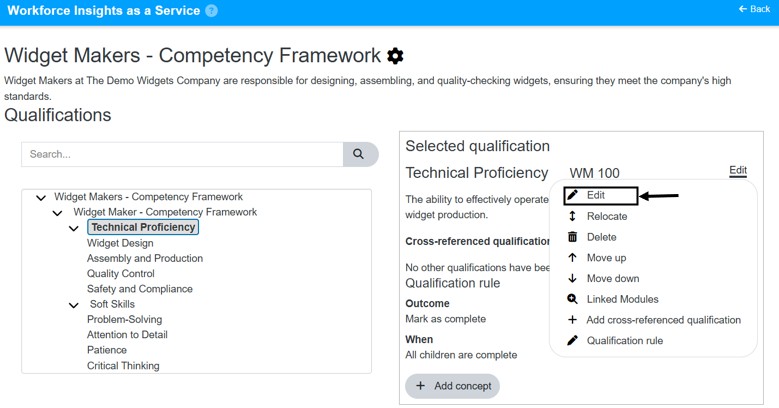
- Update the qualification details.
- Select Save Changes.
Video
*Note: This video reflects a previous version of the platform. Access Admin Dashboard from the left navigation menu. The remaining steps are unchanged.
Result
- The qualification details are updated in the framework.
- Future plan setup uses the revised qualification information.
Notes / Tips
- Review the qualification carefully before saving so dependent plans stay accurate.
- Update naming and requirement details consistently across related qualifications.
Troubleshooting
Common issue: The changes do not appear after saving.
Solution: Reopen the qualification and confirm the updated values were saved.
Common issue: You cannot edit the qualification.
Solution: Confirm you selected the qualification itself and not only the framework or subcategory.