Move a Qualification Up or Down
Overview
Use this page to move a qualification within the same framework (for example, between domain or subcategories). This helps reorganize qualifications without changing their framework context.
Permissions / Access
Who can perform this action?
- Company Manager
Navigation Path
Admin Dashboard -> Qualifications Tab -> Manage Qualification Frameworks
Steps
- Click on Admin Dashboard in left navigation menu.
- Select the Qualifications tab.
- Select Manage Qualification Frameworks.
- Open the framework that contains the qualification.
- Select the qualification you want to move.
- Select Edit.
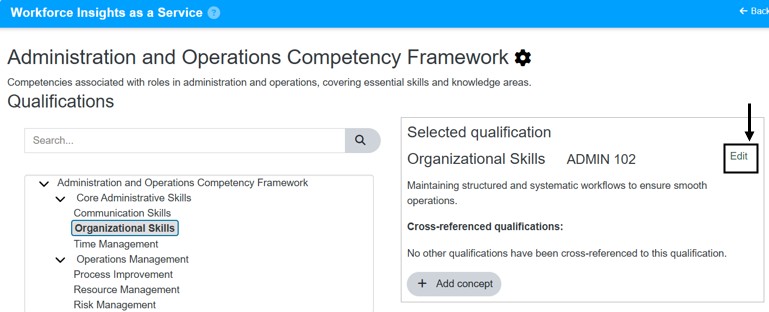
- Choose Move Up or Move Down.
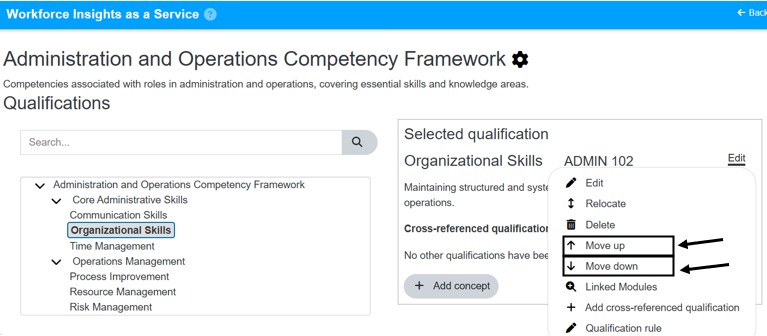
- Confirm the change.
Result
- The qualification is moved to the selected subcategory within the same framework.
- References and plan associations remain intact when the framework is unchanged.
Notes / Tips
- Use move (within framework) when you only need to reorganize subcategories.
- Confirm qualification permissions and settings before moving.
Troubleshooting
Common issue: Qualification not found in new domain or subcategory.
Solution: Refresh the page and verify the target domain or subcategory.
Common issue: Move option is not available.
Solution: Confirm you have the correct permissions and that the qualification is not locked by another process.