Relocate a Qualification
Overview
Use this page to relocate a qualification from one domain or subcategory to another. This is useful when a qualification was created in the wrong framework or needs to be reorganized.
Permissions / Access
Who can perform this action?
- Company Manager
Navigation Path
Admin Dashboard -> Qualifications Tab -> Manage Qualification Frameworks
Steps
- Click on Admin Dashboard in left navigation menu.
- Select the Qualifications tab.
- Select Manage Qualification Frameworks.
- Click on the framework that contains the qualification.
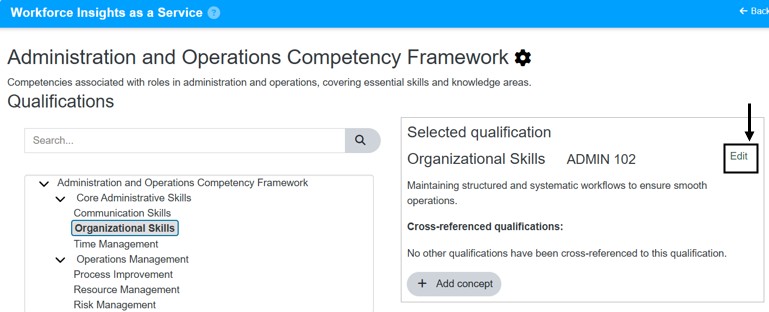
- Select the qualification you want to relocate.
- Select Edit
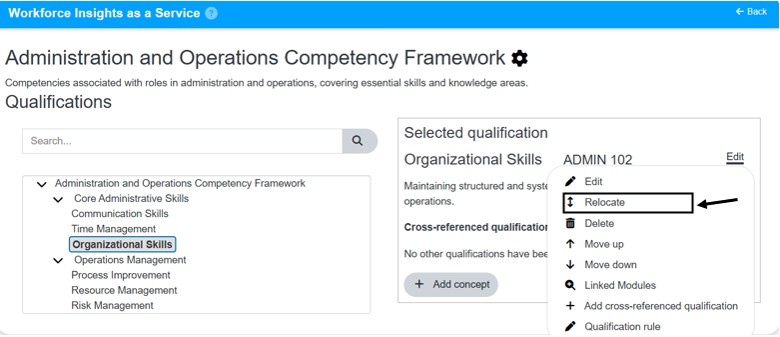
- Choose the Relocate option.
- Select the domain or subcategory where the selected qualification should be moved.
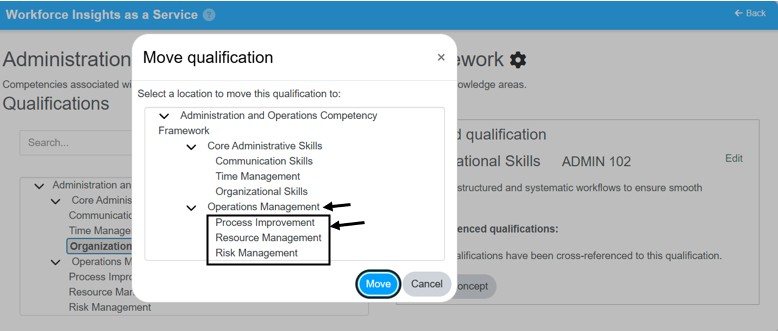
- Confirm the relocation and select Move.
Result
- The selected qualification is moved to the preferred domain or qualification .
- Any references that rely on the qualification may need to be reviewed.
Notes / Tips
- Verify the target framework's settings and permissions before relocating.
- Communicate changes to teams that may rely on the qualification.
Troubleshooting
Common issue: Qualification not visible after relocation.
Solution: Refresh the page and check the target framework/subcategory.
Common issue: You cannot relocate the qualification.
Solution: Confirm you have Company Manager permissions and try again.