Edit Mode
Overview
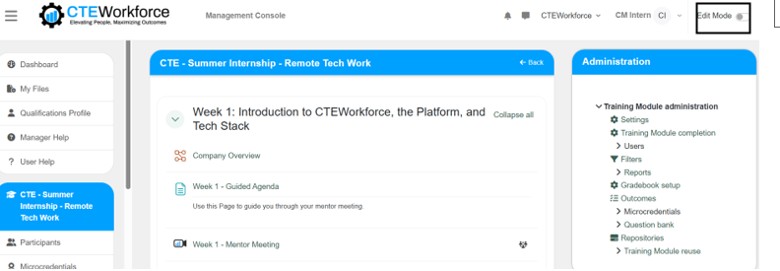
Edit Mode is a toggle switch on the top right of every training module page that enables company managers to add, move, hide, edit, or delete training module activities, resources, and sections.
Permissions / Access
- Company Manager
Navigation Path
Training Dashboard -> [Select Training Module] -> Toggle on the "Edit Mode" switch in the top right corner (switch turns blue when toggled on)
Steps
- Click on the Training Dashboard on the left navigation menu.
- Open the training module you want to edit.
- Look for the Edit Mode toggle switch in the top-right corner of the page.
- Click the switch to turn on Edit Mode.
- You can now add, move, hide, or edit course activities, resources, and sections.
Result
- Edit Mode is activated on the training module.
- Additional options and controls become available for managing training module content.
- You can make changes to the training module structure and content.
Notes / Tips
- Edit Mode must be enabled before you can add or modify activities, resources, and sections.
- Turn off Edit Mode when you are done making changes to avoid accidental modifications.